
Skip the waiting. Let us make the call for you!
Instead of spending time calling restaurants, clinics, stores, friends, or service providers, you can ask CALL-E to handle the call for you.
It can make calls, ask questions, confirm appointments, leave voicemail messages, and report back with what happened. CALL-E is built for everyday tasks where a phone call is still faster than an email or message.
AI Rudder is the parent company behind CALL-E, previously known as BotLab on ChatGPT. AI Rudder powers conversational AI for 500+ companies, including SHEIN, TikTok, and Standard Chartered. The company has raised US$50M from Tiger Global and Sequoia, and has been featured in Business Insider.
How to connect CALL-E on ChatGPT
You can start using CALL-E directly inside ChatGPT here:
https://chatgpt.com/apps/botlab/asdk_app_6985b1b1d23081919592a355865b08c2
Once connected, CALL-E becomes your AI phone assistant inside the chat interface. Simply describe the task, and CALL-E will place the call for you.
Example:
“Call Bella’s Bistro at [Insert country code and phone number] and book a table for 2 people tonight at 7 PM.”
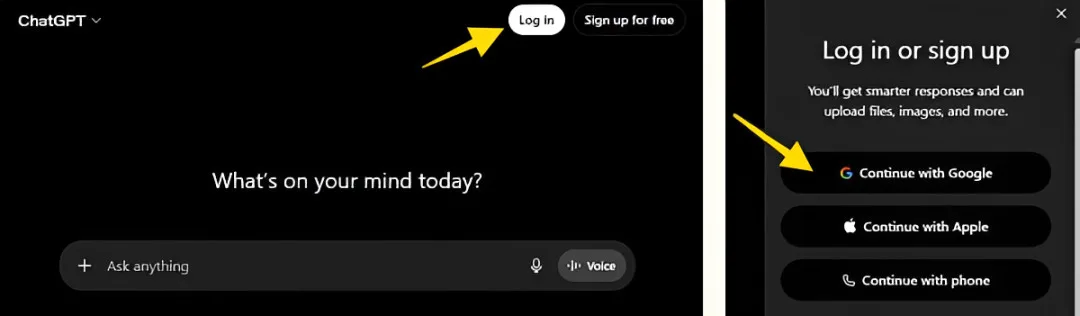
Step 1: Log in to ChatGPT
Go to ChatGPT and log in to your account.
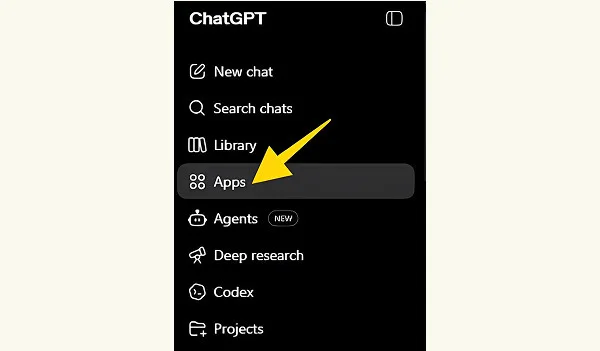
Step 2: Click “Apps”
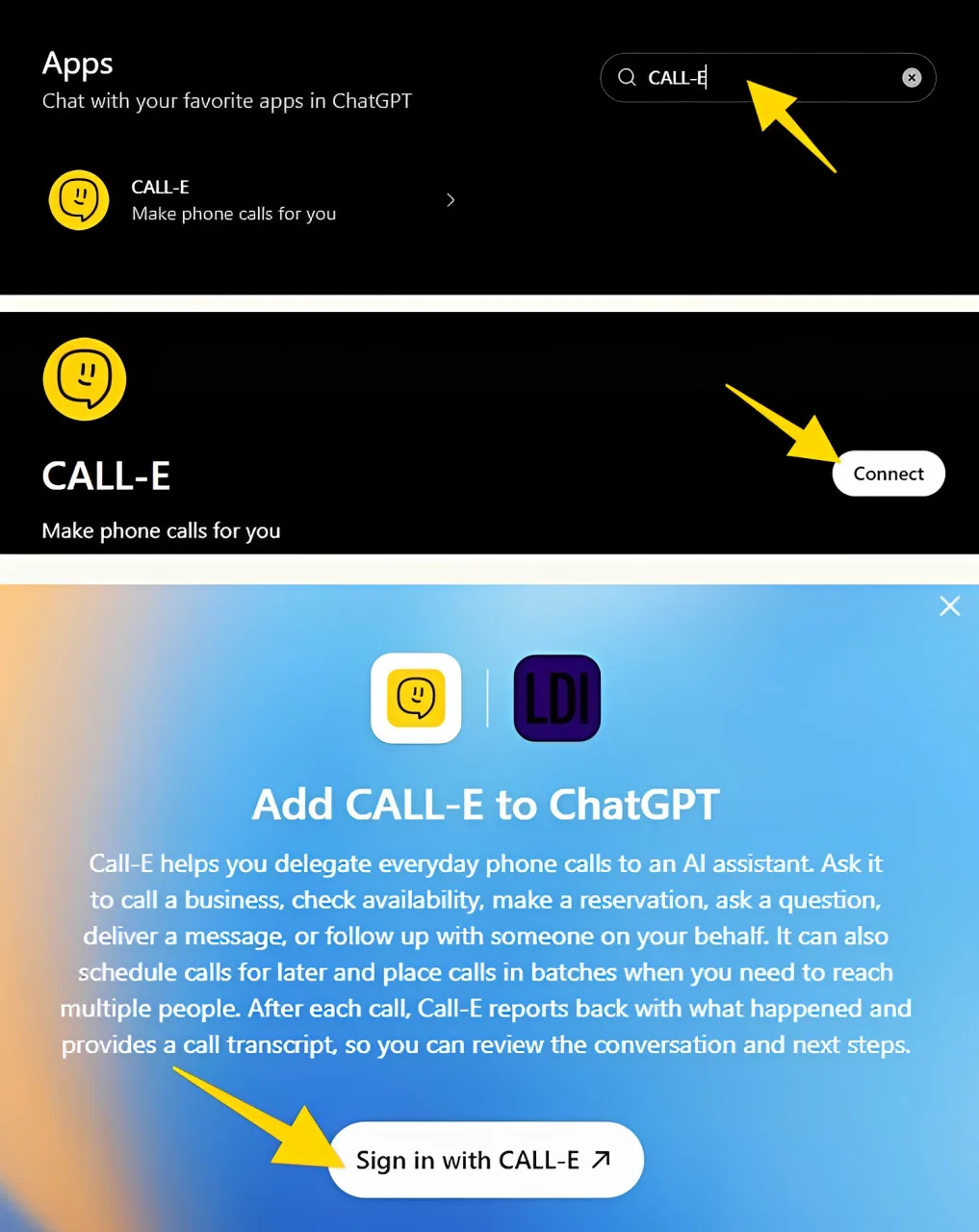
Step 3: Search for "CALL-E"
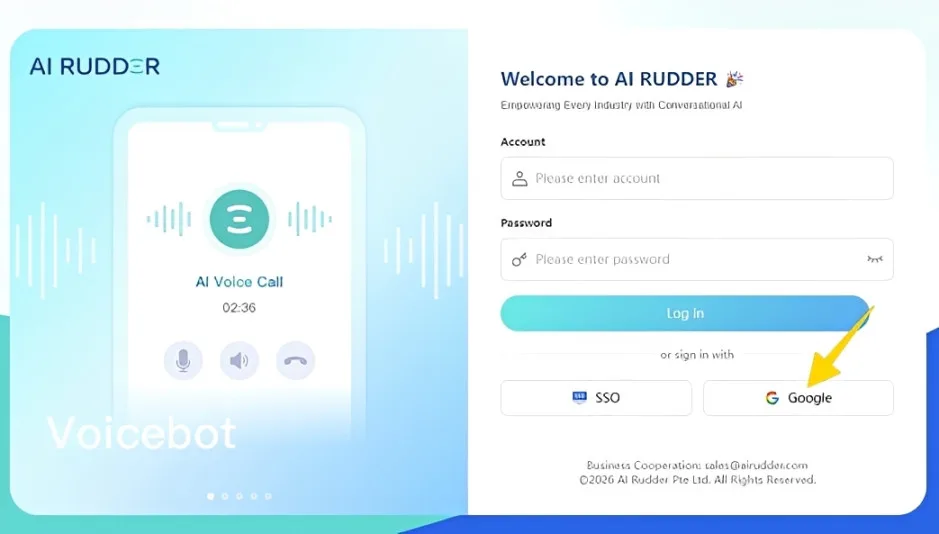
Step 4: Register with your Google-authenticated email
AI Rudder is the parent company behind CALL-E, previously known as BotLab on ChatGPT. AI Rudder powers conversational AI for 500+ companies, including SHEIN, TikTok, and Standard Chartered. The company has raised US$50M from Tiger Global and Sequoia, and has been featured in Business Insider.
Step 5: Click "Start Chat"
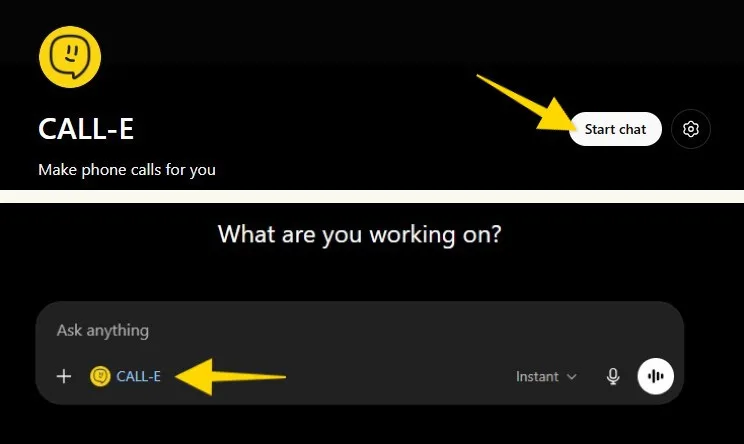
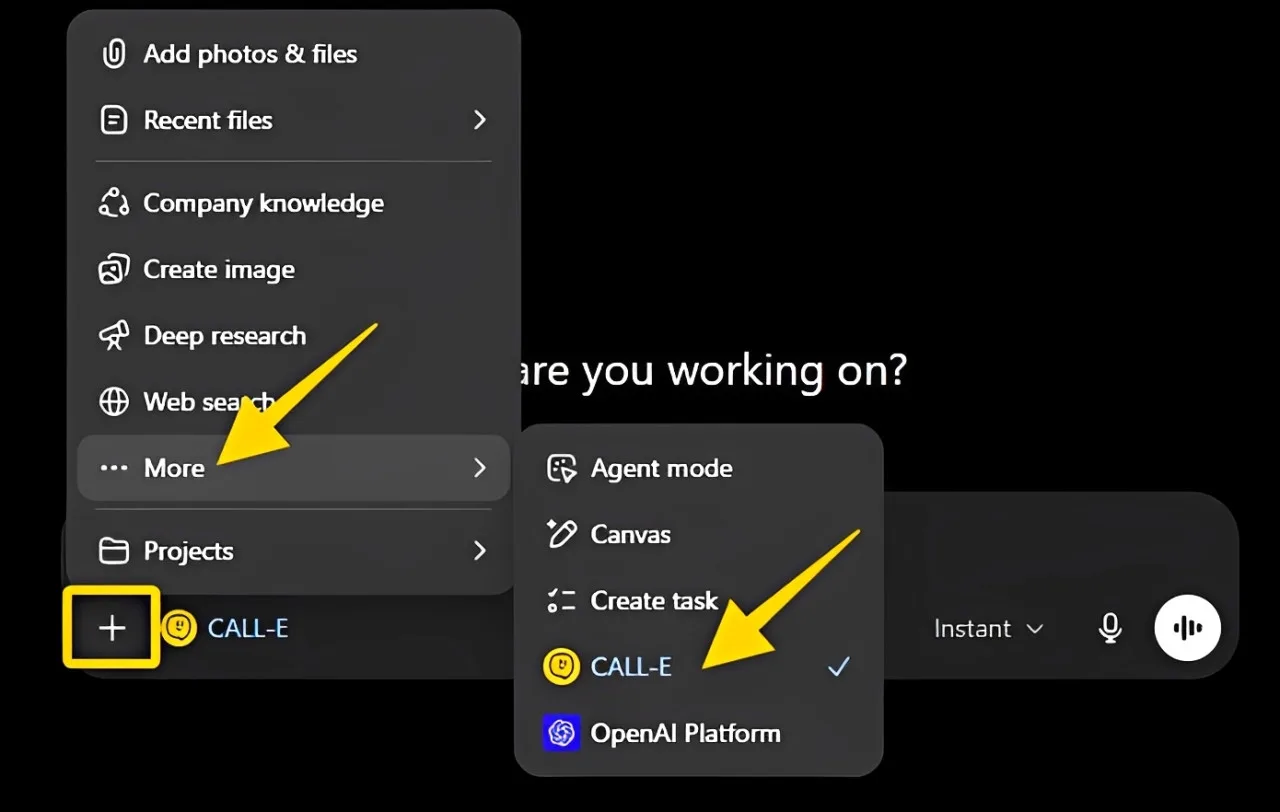
Step 6: Ask CALL-E to make a call
Now you can prompt CALL-E with a clear task.
Example:
“Call Bella’s Bistro at [Insert phont number with a country code] and make a dinner reservation for 2 people this Saturday at 7 PM. Ask for a window seat if available.”
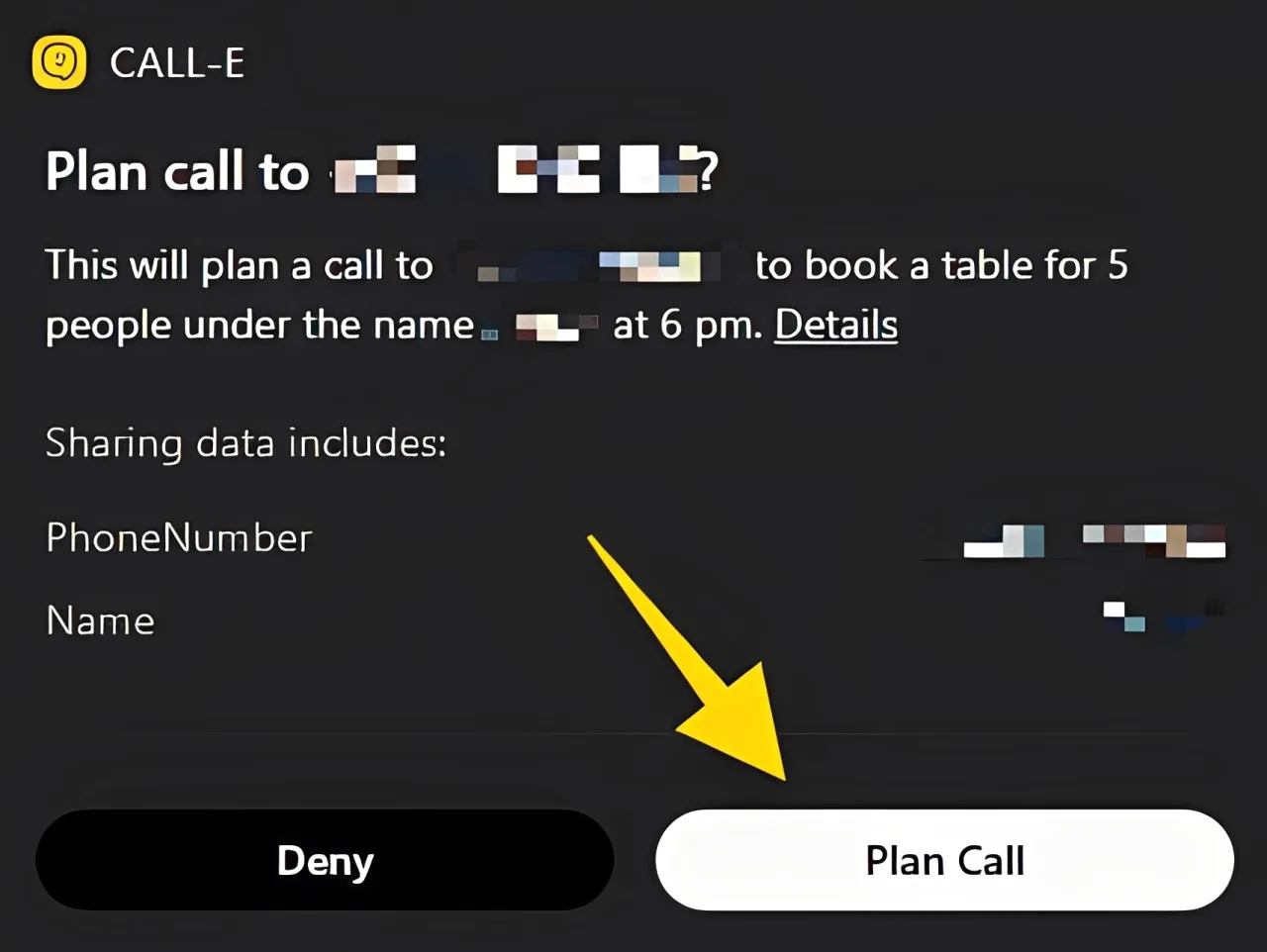
Click “Plan Call” and CALL-E will place the call, speak to the person or voicemail, and report the result back to you.
Top CALL-E use cases
1. Contacting acquaintances
Use CALL-E to pass a message, confirm plans, or coordinate with someone.
Example prompt:
“Call Jamie and ask if they are free for lunch tomorrow at 12:30 PM. If they confirm, ask if they want me to bring anything.”
Example call flow:
CALL-E: “Hi Jamie, Alex asked me to check if you’re free for lunch tomorrow around 12:30 PM.”
Jamie: “Yeah, that works.”
CALL-E: “Great. Do you want Alex to bring anything?”
Jamie: “No, I’m good.”
CALL-E: “Perfect. I’ll let Alex know.”
This is one of the strongest current consumer use cases because it helps with social coordination and simple everyday planning.
2. Leaving voicemail messages
If the person does not answer, CALL-E can leave a clear voicemail.
Example prompt:
“Call Sam and let them know their package will arrive tomorrow morning. Ask them to pick it up from the front desk.”
Example voicemail:
“Hi Sam, this is Alex’s AI assistant. Alex wanted to let you know that your package will arrive tomorrow morning. Please pick it up from the front desk.”
3. Restaurant reservations
CALL-E can call restaurants to book or change reservations.
Example prompt:
“Call Bella’s Bistro and reserve a table for 2 people on Saturday, May 16 at 7 PM. Ask for a window seat if available.”
CALL-E can also handle changes.
Example prompt:
“Call Bella’s Bistro and change my reservation from 7 PM to 8 PM.”
4. Order changes and merchant questions
CALL-E can call a merchant to check order details or request changes.
Example prompt:
“Call the bakery about order C1023. Ask them to change the frosting to half chocolate and half strawberry, and add the message ‘Happy Birthday Lily.’ Also ask if there is any price difference.”
5. Appointment confirmations
CALL-E can confirm appointments with clinics, salons, dentists, or other service providers.
Example prompt:
“Call BrightSmile Clinic and confirm my dental appointment tomorrow at 10 AM. Also ask if I need to bring anything.”
Example call flow:
CALL-E: “I’m calling to confirm the appointment tomorrow at 10 AM.”
Clinic: “Please bring your insurance card and arrive 5 minutes early.”
CALL-E reports the details back to you.
6. Urgent reminders for finance, gaming, or operations users
CALL-E can also support real-time reminders when a phone call is more reliable than a message.
Example prompt:
“Call me immediately if there is a transaction anomaly or account risk event.”
This is useful for financial analysts, traders, gaming operators, or operations teams who need fast phone-based alerts.
👍Note: Please refer to section, “Use CALL-E on other coding agents and AI assistants”, for more information.
Where CALL-E is currently available
CALL-E currently supports calls in selected countries, including the United States.
Some countries are not currently supported, including Kenya and Vietnam.
Note: Availability may change, so check inside CALL-E before placing a call. If you need assistance, please contact the CALL-E support team at support@heycall-e.com.
Tips for better CALL-E prompts
Give CALL-E:
1. Who to call and what number (including the country code)
2. The goal of the call
3. Key details like date, time, order number, or phone number
4. What to do if no one answers
5. What information to report back
A strong prompt looks like this:
“Call Bella’s Bistro to book a table for 2 people this Saturday at 7 PM. Ask for a window seat. Use my phone number for the reservation. If they do not answer, leave a voicemail and ask them to call me back.”
CALL-E works best when your request is specific, simple, and outcome-focused.
Use CALL-E on other coding agents and AI assistants
CALL-E is designed to work wherever modern AI workflows happen. You can use it directly inside ChatGPT, or connect it to coding agents and desktop AI assistants.
👍 Other supported platforms include:
Codex, Claude Code, Cursor, OpenClaw, Hermes, AiderDesk, Amp, Kimi Code CLI, Replit, Universal, Antigravity, Augment, IBM Bob, Claude Code, OpenClaw, Cline, Dexto, Warp, CodeArts Agent, CodeBuddy, Codemaker, Code Studio, Codex, Command Code, Continue, Cortex Code, Crush, Cursor, Deep Agents, Devin for Terminal, Droid, Firebender, ForgeCode, Gemini CLI, GitHub Copilot, Goose, Hermes Agent, Junie, iFlow CLI, Kilo Code, Kiro CLI, Kode, MCPJam, Mistral Vibe, Mux, OpenCode, OpenHands, Pi, Qoder, Qwen Code, Rovo Dev, Roo Code, Tabnine CLI, Trae, Trae CN, Windsurf, Zencoder, Neovate, Pochi, AdaL。
Instead of maintaining separate integrations for each platform, CALL-E uses a universal installation approach that works across most modern AI agents.
To install, users simply copy and paste this prompt into their AI assistant:
👍 Install CALL-E for me:
https://raw.githubusercontent.com/CALLE-AI/call-e-integrations/main/docs/install/CALL-E-installation-guide.md
That’s it. The AI assistant handles the setup process automatically.
Note: If you experience setup or connectivity issues, make sure you are logged out of ChatGPT on the same browser if it is using the same email address associated with your AI Rudder account. This helps prevent authentication conflicts during the connection process.
If you need assistance, please contact the CALL-E support team at support@heycall-e.com.
Useful links
|
Desktop & Local Assistants
|
Please install the CALL-E skill for your agent, use the following command.
Replace <agent> with the name of your current agent:
npx skills add https://github.com/CALLE-AI/call-e-integrations –skill calle –agent <agent>
See installing details on github
|
For support tickets, contact support@heycall-e.com